Get Social With Grace
  • Home
  • Social Media Services
    • Services and Pricing
    • Managed Plans
    • Are you a marketing agency?
  • Top Tips
    • How to Get Social
    • 2026 UK Awareness Days Calendar
  • Client feedback
  • Get in Touch
  • Menu Menu
  • Link to LinkedIn
  • Link to Instagram

Boost your Facebook page likes in just a few clicks!

September 30, 2025/in Facebook, Social media

Facebook is a great platform for all kinds of businesses, but sometimes it can feel like a struggle to get more page likes and reach new people. There’s no point in creating amazing content if hardly anyone sees it, so here’s a quick tip to help you grow your numbers.

Step 1


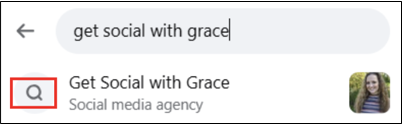
Start by logging into your personal Facebook account, then use the search bar to find the business page.

Step 2 


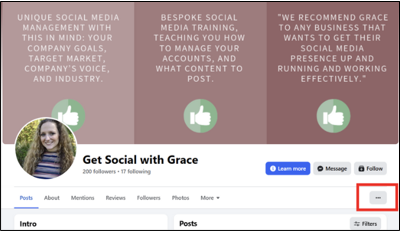
Once you’re on the page, click the three dots on the right-hand side.

Step 3


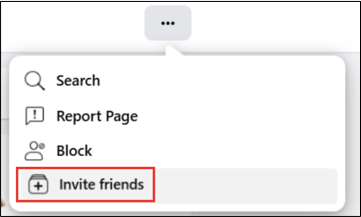
Select ‘Invite Friends’ from the menu.

Step 4


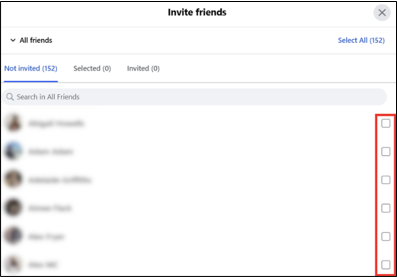
You’ll see a list of all your Facebook friends. Tick the friends you want to invite or click ‘Select All’ in the top right.

Step 5

Send the invitations and that’s it!


One of the best parts about this hack is that you don’t need to be a page admin to do this. Anyone can use this simple trick, friends, family or colleagues, to help more people hear about your business. It takes a few minutes and could easily bring in some new customers.


https://getsocialwithgrace.com/wp-content/uploads/2025/09/GSWG-Boost-your-Facebook-page-likes-in-just-a-few-clicks-1500-x-1000-px.png 1000 1500 Grace https://getsocialwithgrace-com.stacktemp.com/wp-content/uploads/2023/08/get-social-with-grace-web-logo-300x99.png Grace2025-09-30 14:12:152025-09-30 14:16:49Boost your Facebook page likes in just a few clicks!

How to make your social media cover images stand out

February 3, 2025/in Facebook, LinkedIn

Cover images are like the welcome mat of your online profile—they make the first impression. It’s important to consider the size, the device you’re using and what you want to include. We’ve got a handy guide with all the important details to help you create the perfect cover images on Facebook and LinkedIn, with some client examples that we’ve created.

Facebook

Your Facebook cover photo is one of the most noticeable parts of your page, so getting it right is key. A cover image that’s too big will be cropped, cutting off important parts of your content. On the other hand, a too-small image will look stretched and pixelated, giving a poor first impression. So, what’s the correct size for a Facebook cover image?

  • Desktop: 820 pixels wide by 312 pixels tall
  • Mobile: 640 pixels wide by 360 pixels tall

As you can see, the sizes vary depending on the device, but designing your cover photo with the desktop view in mind is generally the best approach. Canva offers templates to help you get the right size, so there’s no need to worry about that. However, keep in mind that the left side of your cover photo will be covered by your profile picture and on mobile, up to 75% of your profile picture might overlap into the cover photo. Therefore, make sure the important imagery or text is kept to the right.

Examples


Given the increasing number of people using Facebook on mobile devices, ensure that no important content is missing. If you plan on incorporating text or your logo into your cover image, exporting the file as a PNG will give you the best results.

LinkedIn cover image

Creating a LinkedIn cover image doesn’t have to be complicated. Even though the dimensions are quite specific (1,584px by 396px), the good news is that they stay the same across all devices. The trick is to make the most of this space without overthinking it.

LinkedIn personal profile

For personal profile pages, think of your cover image as a quick introduction. Include your contact details, a headline about yourself and maybe a notable achievement you’re proud of. This way, when someone visits your profile, they get a snapshot of who you are right at the top.

Company pages

For company pages, you may want to utilise this space to show off your projects or team, or add in your contact details or company tagline. This will help communicate your company’s identity and mission in a simple and effective way.


Quick note on profile pictures

Your profile picture should be recent, and your face should take up around 60 percent of the total space. It should match how you would normally look in your work environment so people can easily identify you, for example if they’re briefly met you through networking. Here’s more on elevating your LinkedIn profile.

Whether you’re starting from scratch on social media, or you’re branching out onto different social media platforms, at Get Social with Grace we can set up Facebook, Instagram, LinkedIn, Twitter and YouTube on your behalf.  We’re here to make sure your profiles are set up correctly from the start. Contact us for more info!

https://getsocialwithgrace.com/wp-content/uploads/2025/01/GSWG-cover-image-blog-post-.png 800 1200 Grace https://getsocialwithgrace-com.stacktemp.com/wp-content/uploads/2023/08/get-social-with-grace-web-logo-300x99.png Grace2025-02-03 09:33:092025-02-03 17:35:10How to make your social media cover images stand out
Facebook business page

Should I still have a Facebook business page?

June 20, 2023/in Facebook

Using Facebook definitely has its benefits for businesses, with many prioritising the platform for their paid advertising campaigns because of their successful results. And since Facebook owns Instagram, it’s easier to establish a presence on both platforms, as they work well together with many of the same features – linking your accounts and messages, comparing insights, creating adverts across both channels, etc.

Also Facebook has an estimated 2.9 billion users which certainly isn’t a figure to glance past when thinking about your marketing strategies! But I always stress to my clients to be mindful of not joining every social media platform just for the sake of it. 

Consider – what type of content would you actually post? Do you have the necessary skills and time to understand and utilise the platform effectively?

To help in your decision making processes, here are some pros and cons of having a company Facebook page:

PROS to having a Facebook business page
  • Brand awareness – Facebook is one of the largest social media platforms in the world. 
  • Targeted advertising – as mentioned before, lots of businesses are now prioritising Facebook for their social media paid advertising because of their successful results. Particularly beneficial for e-commerce based businesses.
  • Highly-tailorable, targeted advertising settings.
  • It has a strong user-base for a slightly older demographic (ideal for targeting those 30+, Gen X and Boomers).
  • The company page settings are tailored for businesses – you can add your opening times, website link, service options, reviews and much more.
  • Customer service live chat communication option.
  • Options to monitor and improve your Facebook page’s insights on a daily basis.
  • Ability to join groups on Facebook.
CONS to having a Facebook business page
  • It’s much more difficult to reach people with only organic content compared to other platforms, due to the high volume of content created on the platform combined with Facebook encouraging businesses to spend money on boosted posts and advertisements.
  • Not so well suited for targeting younger generations (specifically those under 30, potentially Instagram and TikTok could be better platforms for this).
  • Some research suggests people are more likely to view content on Facebook as fake or misleading (if your brand chooses to be on Facebook, it’s important to work extra hard to ensure your audience know you’re authentic).
  • If you want to run paid advertising you’ll need to set aside a budget and do some trial and error in the beginning with testing out different ads.
  • Time and resources – if you don’t have the time and resources to create content tailored to this platform, it’s probably better for you to not be on it.
So should you have a Facebook business page?

Take a look at the pros and cons above, and compare them related to your business. Does your business have the time, resources and man-power to INVEST in this platform with the aim of getting a healthy ROI? Don’t forget that with everything, there will be some experimenting in the beginning to find the right strategy for you. But if you have the capacity to take this on, it can still be a strong tool for your business.

Also think about both your big competitors as well as your audience. Where are they hanging out?

https://getsocialwithgrace.com/wp-content/uploads/2023/06/Facebook-business-page.jpg 1335 1920 Grace https://getsocialwithgrace-com.stacktemp.com/wp-content/uploads/2023/08/get-social-with-grace-web-logo-300x99.png Grace2023-06-20 12:05:002023-07-12 12:03:53Should I still have a Facebook business page?
Canva hacks

8 Canva hacks to make your life easier

March 4, 2022/in Facebook

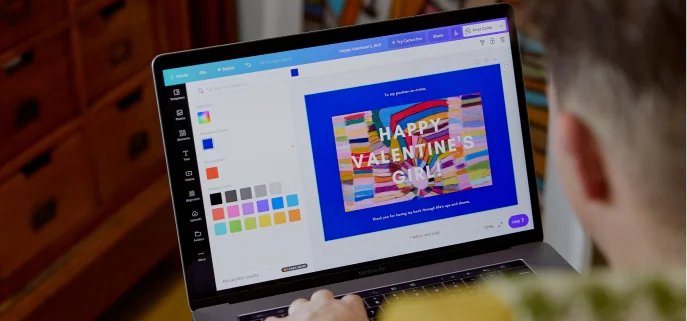
Canva might just be one of the best inventions of the 21st century. I use it daily and I always recommend it to other businesses. It’s a free online graphic design programme that allows you to create beautiful graphics with minimal design knowledge. Designs include social media posts, email headers, business cards, presentations and more.

Canva has so many useful features, so I thought I’d write an article on some of the tricks you may not have known.

1. Brand kits

Do you have a colour scheme, perhaps for your branding? Save yourself from frequently typing in the hex codes by saving “brand kits” – the exact colours and fonts for your brand. Then when you’re working on your design, you can simply select colours and fonts from your brand kit, rather than having to manually enter or search for them.

Canva brand kit

2. Transparency

You probably knew that you can make final designs transparent. But did you know that you can make elements transparent too? This is especially helpful if you’re using a coloured background or overlaying your designs.

Canva transparency

3. Grid view

If you’re designing something with lots of pages, it’s easy to get lost when constantly scrolling through them. If you click on ‘grid view’ on the bottom right, you’ll see each of your pages at once.

4. External linking

If you’re creating something for the web such as a PDF, you can make any element clickable. Click on whatever image you’re linking, and click on the chain icon to enter your link.

Canva external linking

5. Get inspiration from completed designs

Starting a design from scratch and don’t know where to begin? You can get inspiration from completed designs. Visit Canva’s Design Inspiration and find examples to help you get over your creative block. Or search for samples on Google.

6. Use Canva frames to display mock-ups or create collages

Canva Frames is an amazing featured for adding frames around your designs, create photo collages, grids, and cut-outs of different shapes.

Under the elements tab, type in Frames in the search bar. Select the frame/grid/mock-up of your choice, then drag and drop any image within it! You can double click the image to adjust it.

Canva frames

7. Add a QR code to your designs

So this one’s really cool. Canva’s URL Generator is extremely helpful while designing business cards or marketing materials to promote something such as your website.

In the left sidebar, go to the ‘More’ option then select the QR code Generator under Apps and Integrations. Then add your URL in and your link will be converted into a QR code that people can scan through their mobile phones!

8. Utilise the keyboard shortcuts
  • Add text: press the “T” key.
  • Add a line: Click the “L” key
  • Rectangle: Click the “R” key
  • Transform text to Uppercase: Shift + cmd/ctrl + “K” key
  • Bold text: cmd/ctrl + “B” key
  • Duplicate elements: cmd/ctrl + “D” key
  • Group elements: cmd/ctrl + “G” key
  • Ungroup elements: shift + cmd/ctrl + “G” key
  • Select all items on layer: cmd/ctrl + “A” key
  • Send element forward: cmd/ctrl + “]”
  • Send element backward: cmd/ctrl + “[“
  • Undo an action: Cmd/ctrl + Z
https://getsocialwithgrace.com/wp-content/uploads/2022/03/Canva-hacks.png 386 687 Grace https://getsocialwithgrace-com.stacktemp.com/wp-content/uploads/2023/08/get-social-with-grace-web-logo-300x99.png Grace2022-03-04 15:27:492023-02-14 16:19:108 Canva hacks to make your life easier
facebook organic reach

6 powerful ways to boost your Facebook organic reach

January 19, 2022/in Facebook

Due to the ever-changing Facebook News Feed algorithm, many marketers believe the days of organic Facebook reach are over. Yes, it’s more difficult for your content to perform well organically, but it’s not impossible.

The new Facebook algorithm is encouraging more meaningful interactions, and giving users more control over content creation. Posts in the News Feed are ordered by Facebook showing you what they believe could be most meaningful, exciting or useful to you. This means you should publish content that visually appealing, with an interesting caption.

But that’s just one tip – there’s so much more you can do.

Here are some proven ways to boost your Facebook organic reach:

1. Publish native videos

Start capitalising on one of the most attractive and easy-to-consume content formats – video. Native Facebook videos achieve a higher organic reach rate compared to statuses, links or photos. Deliver the most valuable, compelling information in the first 3-5 seconds to engage viewers.

Don’t forget to add captions to your videos for many of us who watch videos without sound.

PRO TIP: Facebook rewards you with a 10x higher reach for sharing native videos directly to the platform. But if you want to connect users to your YouTube channel (for example to collect data for Google Ads) and are worried your organic reach might drop, try publishing a mix of native videos and YouTube links.

2. Mix up your post formats

Although video can shoot up your Facebook organic reach, it shouldn’t be the only content format you’re leveraging. Mixing up the types of posts you share is essential in keeping your feed attractive and audiences interested. The more interesting and diverse your content, the higher the chance your followers will share it.

Here are some of the other post types that work:

  • Images
  • Quotes
  • Open-ended questions
  • GIFs
  • Text only posts
  • Polls
  • Blog posts

As long as your posts are quality, compelling, and on par with your audience’s interests, they’re likely to earn lots of engagement!

3. Fine-tune your publishing time

Understanding your publishing time is vital, because posting when your audiences are online increases the visibility of your content. One way to figure out your optimal posting time is by looking into your performance data and pinpointing a pattern of increased interactions.

Pro tip: If you want your audience to see your content every time you publish, ask them to turn on their notifications for your posts.

4. Capitalise on trending topics

Create a strong content strategy by following the trendiest topics on the platform. You can even use Facebook Business’ Hot Topic Tool to see the latest trends, by category, industry, date, age, gender and more.

When planned and timed diligently, you can attract more traffic and gain exposure for your brand. Just make sure it can relate to your business in some way.

5. Be human

If you interact with Facebook users as a human being, personalise your responses, and show you genuinely care about your community, people will feel more connected to your business. Engage your audience in an active dialogue by asking thoughtful questions. This is a great way to initiate interactions, which helps to improve your organic reach.

Understand your audience’s demographics, affinities and behaviours in order to tailor your posts accordingly and make them more shareable.

6. Increase engagement

Encourage employees, friends and family to engage with your business content. This will boost the algorithms, meaning your content will be shared to a wider amount of people.

Organic Facebook reach is dropping, but it’s not dead yet, and there are still ways to combat the News Feed algorithm. The game has changed, but play it well and to your advantage, using the tips outlined in this article.

If you shift the focus away from your brand and think audience-first, you’ll be able to create amazing content, get more shares, and skyrocket your organic Facebook reach.

https://getsocialwithgrace.com/wp-content/uploads/2022/01/facebook-organic-reach.jpg 666 1000 Grace https://getsocialwithgrace-com.stacktemp.com/wp-content/uploads/2023/08/get-social-with-grace-web-logo-300x99.png Grace2022-01-19 16:00:522022-01-19 16:00:526 powerful ways to boost your Facebook organic reach
Facebook engagement

20 Facebook post ideas that will generate even greater engagement

August 21, 2020/in Facebook

In the last few years, it has become harder than ever to see organic engagement on Facebook posts from Pages. There’s much more competition, with more brands fighting for consumers’ attention. You need to be extra creative to get your business noticed.

But worry not, because I’ve come up with 20 Facebook tactics that are sure to generate high engagement.

1. Share trends

Posts about trending topics are actually rewarded by Facebook’s news feed algorithms. Find trends that your audience is likely to be interested in or talk about. By posting around it, you can have the opportunity to interact with your fans by asking questions and responding to comments.

2. Update profile and cover photos

Change your profile picture and cover photos regularly. By doing this, you are able to keep your page and followers up-to-date. Here are a couple of pointers:

  • Profile pictures should always feature your brand’s logo.
  • The cover photo is a big space and the first thing people see when visiting your page – so make it count! Incorporate special offers, your USPs, etc.
3. Share what’s on your mind

Stand out from the saturated, salesy posts by sharing what’s on your mind for the day, and see if people respond. Take the opportunity to share the thoughts of the people behind the logo. People are much more interested to connect and engage with business owners and staff.

4. Take a selfie!

Selfies are a great way to connect your brand with your fans, while making your brand more personable. Relate it to your business in some way. Your audience will be likely to engage and react strongly with this type of post.

5. Repost viral photos

Posting viral photos from the internet is a fun option if you’re out of Facebook post ideas. Look for memes, funny photos or quotes, keeping it relevant to your industry.

6. Get to know your audience

Post questions and fill-in-the-blanks to drive reactions and engagement. People like to share their opinions on Facebook, especially in an easy format. Just make sure you acknowledge and reply to all comments.

7. Educational posts

Educational posts can provide excellent value to consumers. Examples of this type of post include tips, tutorials, and industry-related news. If your audience finds value in your post, they’re more likely to engage.

8. Be you!

Most Facebook users are on the platform to interact with their friends and family, so act and post the way you would normally in real life. This can allow your brand to sound more personable while still growing engagement.

Consumers are more likely to interact with posts that have a human tone of voice than if they feel like they’re interacting with bots.

9. Highlight your fans

Give the spotlight to your customers and fans by posting about them. This way you can build up two things that are vital to your brand: trust and credibility. Highlighting real customer posts using your product or service is a testimony in itself. Plus, most Facebook users love to receive a shoutout from a business!

10. Post inspiring quotes

People often connect well with inspiring quotes. They are uplifted by them, and it would be great if they connect that positive feeling to your brand.

11. Boost your posts

Boost posts to increase your reach and engagement. You can do this at a small cost: just boosting for £5 over a couple of days can increase the audience reach by around 1000 (targeted!) people.

12. Company milestones

Company anniversaries, new clients, staff milestones… These are all excellent things worth sharing! They are positive pieces about your brand, showcasing you in a great light.

13. Post product photos

Share photos of your product being used. This will show people how it’s used and that others are buying it, making them more likely to engage with the post and potentially make a purchase.

14. Throwback Thursday posts

Throwback Thursday (or TBTs) posts are one of the many fun trending types of posts you can get involved in.

The idea is to post an old photo from the past using the hashtag #ThrowBackThursday or #TBT. People love to see history or how things have changed. Post ideas include stories of the business first launching, or photos of you or your staff when younger.

15. Create polls

Polls are a fun way to get your audience engaged. These can be related to anything, or you could create polls based on your business/services to get data of what people think about you. Polls can be an insightful way of gathering information.

16. Awareness days

Do you ever see random posts like to #NationalDoughnutDay on Facebook? These are fun awareness days that are often trending and get good engagement. There are awareness days on all sorts of things (check out awarenessdays.com for the full calendar). Use these ideas to create fun posts – here are a couple of examples on how:

  • As it’s #NationalPetDay, here is a photo of our IT manager’s dog! Comment below a photo of your furry friend.
  • Today is #EnvironmentalWeek. We’ve listed 5 ways you can make your home more sustainable.
  • Happy #WorldPizzaDay! Our office is debating the greatest pizza toppings – they’re stuck between Hawaiian or Pepperoni! Which is your favourite?
17. Share blog posts

If you have a blog, share your articles – this is an excellent way of driving traffic from Facebook to your website.

Blog posts that get good engagement on Facebook are usually “how-tos”, top tips or industry trends and news.

18. Talk about charities and causes

Do you have a charity close to you? Post about it!

Share how you or your business gives back to the community, and explain why your chosen charity is important to you. These posts are well-received on Facebook, plus the charity will be pleased to receive brand awareness from you.

19. Share testimonials

Build your credibility by sharing customer reviews and testimonials. You can also encourage people to leave reviews on your Facebook Page, which you can put on your website, and create social media graphics with to repost.

20. Thank fans for comments

Thank your audience for actively engaging with your posts. This can be a nice post idea by itself, letting them feel appreciated and heard. It’ll encourage them to continue engaging with your page.

(MORE: How employees can improve social media organic reach and engagement)

https://getsocialwithgrace.com/wp-content/uploads/2020/05/Facebook-engagement.png 800 1200 Grace https://getsocialwithgrace-com.stacktemp.com/wp-content/uploads/2023/08/get-social-with-grace-web-logo-300x99.png Grace2020-08-21 11:38:552020-11-30 14:47:4520 Facebook post ideas that will generate even greater engagement
Video call Facebook update

Facebook’s new changes to help people keep in touch through lockdown

April 29, 2020/in Facebook

Facebook is bringing out various new updates to make it easier for people to keep in contact during lockdown. The biggest change is new Messenger Rooms, which allows for Zoom-like conversations that put lots of people in one video chat.

The person setting up the chat will be required to have a Facebook account, but others who don’t have one can access the chat, on either mobile or desktop. It will also play host to AI-powered immersive 360-degree backgrounds, such as a luxury apartment or the beach.

This service has started being rolled out already, alongside other expanded live video-focused features across Facebook, Instagram and WhatsApp.

Users can share rooms on Facebook through their News Feed, groups and events, while plans are underway to allow rooms to be created from Instagram and WhatsApp.

This update comes from a surge in people turning to video chat technology as a means of keeping in touch during lockdown, with Facebook having more than double of a demand for video calling on Messenger and WhatsApp in areas most affected by coronavirus.

Views of Facebook Live and Instagram Live videos also increased significantly in March – both of which will have updates of their own.

WhatsApp Group Calls will soon be able to host a maximum of eight people instead of four.

Zoom has blown up as a very popular video platform in recent months, though it has been flawed due to security issues which the company is addressing.

Will you be migrating to Messenger Rooms? Or will you be sticking with Zoom?

https://getsocialwithgrace.com/wp-content/uploads/2020/04/Video-call-Facebook-update.png 800 1200 Grace https://getsocialwithgrace-com.stacktemp.com/wp-content/uploads/2023/08/get-social-with-grace-web-logo-300x99.png Grace2020-04-29 15:06:572020-04-29 15:06:57Facebook’s new changes to help people keep in touch through lockdown
facebook pages

Facebook is redesigning Pages: what does this mean?

August 22, 2018/in Facebook, Social media

If you have a Facebook Page for your business, you may have recently received an email saying a new layout of your Page is coming on the 24th of August. There are 80 million pages on Facebook owned by small businesses, and these are the ones targeted to be redesigned.

Read more
https://getsocialwithgrace.com/wp-content/uploads/2018/08/1-DSC_02841-G-Copy.jpg 797 1200 Grace https://getsocialwithgrace-com.stacktemp.com/wp-content/uploads/2023/08/get-social-with-grace-web-logo-300x99.png Grace2018-08-22 12:58:062020-04-02 10:07:48Facebook is redesigning Pages: what does this mean?
Secrets boosting facebook organically

9 secrets that will boost your Facebook reach organically

June 13, 2018/in Facebook

With more than two billion active users, Facebook is one of the best places for your business to be.

But let’s be honest – Facebook organic reach is very difficult for those who want to boost their Page without any ads. You’re competing with so many businesses in your space for attention. You need to stand out to reach your audience if you want to drive traffic.

Read more

https://getsocialwithgrace.com/wp-content/uploads/2018/06/1-Secrets.jpg 797 1200 Grace https://getsocialwithgrace-com.stacktemp.com/wp-content/uploads/2023/08/get-social-with-grace-web-logo-300x99.png Grace2018-06-13 17:09:552018-06-13 17:15:059 secrets that will boost your Facebook reach organically

Recent Posts

  • 5 video ideas for people who hate being on camera
  • What to post when you have ‘nothing to post’
  • Social media myths for small businesses debunked

Get social media tips sent straight to your inbox!

Categories

  • Business
  • Facebook
  • Instagram
  • LinkedIn
  • Social media
  • Twitter
  • Uncategorized

Take the next step by completing this form and I will be in touch.

Or if you’d prefer…

Email me: hello@getsocialwithgrace.com

Give me a call: 07780 436116


    CONTACT DETAILS

    Get Social with Grace  |  Bury St Edmunds, Suffolk  | T: 07780 436116  | E: hello@getsocialwithgrace.com

    © Copyright 2018 - Get Social With Grace
    • Link to LinkedIn
    • Link to Instagram
    Scroll to top Scroll to top Scroll to top