Get Social With Grace
  • Home
  • Social Media Services
    • Services and Pricing
    • Managed Plans
    • Are you a marketing agency?
  • Top Tips
    • How to Get Social
    • 2026 UK Awareness Days Calendar
  • Client feedback
  • Get in Touch
  • Menu Menu
  • Link to LinkedIn
  • Link to Instagram

5 video ideas for people who hate being on camera

March 31, 2026/in Social media

If being on camera isn’t your favourite thing, take it from someone who has a complete phobia of it, you’re not alone. But hey, that doesn’t mean you can’t come up with creative social media video content! There are plenty of fun and engaging alternatives to talking on camera, that allow you to showcase your business, products or services in a way that’s more comfortable. Here are some ideas…

Voiceover existing footage

If the idea of standing in front of a camera feels daunting, how about only hearing your voice? You can film your products, services or workspace,  then add a voiceover to guide viewers through what they’re seeing.

We’ve used this style before with Wright’s Baking, filming the process of making a recipe using their cake or bread mixes. Showing each step gives people something tangible to follow, while the voiceover adds context, tips and personality. It’s an easy, effective way to demonstrate how something works without the pressure of being on camera yourself.


View this post on Instagram


A post shared by Wright’s Baking (@wrights_baking)

Showcasing products

If you’re someone who can’t even stand hearing your own voice on camera, simply prop your phone up somewhere, film the product itself and use your hands to show what matters like how it looks, how it catches the light or how it works.

We’ve done this for Arbour Landscape Solutions‘ paving products. A few quick clips were enough to capture everything we needed because you can film several angles in one go. The whole process is quick to shoot and easy to cut and edit, without needing any voiceover at all.


View this post on Instagram


A post shared by Arbour Landscape Solutions Ltd (@arbourlandsol)

Videos with text

Another option to think about is filming your products, services or your workspace, then cropping and putting those clips together and adding some text over the top – all of which can easily be done on Instagram or CapCut. It doesn’t need to be anything fancy, you can keep it simple as long as it still feels like quality content. The text can explain what’s happening in the video, offer something motivational or even just be a single word that sets the tone.

Take the below example of a reel we created for Derma Clinic Clare. This kind of reel works well for service-based businesses. Either ask a regular client if they’re happy to be on camera, or use a friend as a model.


View this post on Instagram


A post shared by Derma Clinic Aesthetics (@dermaclinic_clare)

Before/after transformations

People genuinely enjoy seeing before and after moments, they’re great for trades companies such as landscapers, architects or builders. A quick video before and after you’ve made a change is usually all it takes, and the editing is straightforward. Just make sure your before and after videos are taken from the same angles for maximum impact.

We’ve done many videos like these over the years, one of which was shared recently for our client Sawston Carpets and Flooring, capturing how a room completely changes once the new floor is down. We simply filmed a walkaround video before it was laid, then an after video matching the before, then cropped them together and put them into one!


View this post on Instagram


A post shared by Sawston Carpets & Flooring (@sawstoncarpets)

Timelapse videos

If the work you’re doing takes a while, or there’s a time-consuming process you want to share, a timelapse video is an easy way to show it. It’s one of the easiest reels to put together because it’s just a single clip sped up. You can choose whether you want to be in the shot or stay out of it, and since there’s no talking involved, you can make the setup as comfortable as you like.

https://getsocialwithgrace.com/wp-content/uploads/2026/03/PXL_20260316_094543071.jpg 1992 1500 Grace https://getsocialwithgrace-com.stacktemp.com/wp-content/uploads/2023/08/get-social-with-grace-web-logo-300x99.png Grace2026-03-31 15:48:002026-04-01 11:59:285 video ideas for people who hate being on camera

What to post when you have ‘nothing to post’

March 3, 2026/in Social media

When you’re trying to stay consistent with your content, there are moments when ideas just don’t come as easily. You know you want to share something, but everything you think of feels a bit too familiar or like you’ve already covered it. It’s natural to slip into, especially when you rely on the same formats or themes over and over, and it can start to feel repetitive.

A mix of approaches can help keep things feeling fresh. To help you out, we’ve put together 30 ideas that cover a range of effort levels and content types, so you’ve always got something to refer to when inspiration is running low.

New content ideas:
  1. A day in the life – a video or multiple photos of what happens across the business on a typical day, with different departments offering their own behind‑the‑scenes view.
  2. Meet the team – short introductions that help readers get to know the people behind the brand and what they enjoy.
  3. New arrivals – updates on fresh stock, upcoming products and any offers tied to them.
  4. Book/podcast – a resource you’ve found interesting and want to share with your audience.
  5. Work in progress – ongoing projects with regular updates on what’s been achieved and what’s coming next.
  6. Current promotions – highlights of any products or services on offer that your audience may want to take advantage of.
  7. Spotlight on favourites – staff picks, bestselling items or brands that are particularly popular right now, with a note on why they stand out.
  8. How to find you – a visual guide to your location, showing the outside of your store or workspace.
  9. Quick tutorials – helpful tips on product use or aftercare that offer immediate value to customers.
  10. A tour of your space – a look around your store or facilities so readers know what to expect when they visit.
Repurposing content:
  1. Before and after transformations – highlight the impact of your work by showing the difference with transformation photos or videos.
  2. Colour themed collections – group projects or products by colour, especially around seasonal moments like Valentine’s, Halloween or Christmas.
  3. “This or that” choices – invite your audience to vote on their favourite option and spark simple interaction.
  4. Stories from your early days – share how your business began, what’s changed and the lessons that shaped your journey.
  5. What sets you apart – revisit moments where you went above and beyond or demonstrated something unique about your approach.
  6. Updated blog snippets – turn older blog posts into refreshed social content with new insights or context.
  7. Bloopers – show the relatable side of your work with moments that didn’t go to plan when filming reels.
  8. Detailed case studies – break down past projects to show the full process, decisions and outcomes.
  9. Throwbacks to past events – look back at events you’ve hosted or attended.
  10. Seasonal comparisons – show how your work or environment shifts across different times of the year.
Graphic posts:
  1. Client testimonials – real experiences from real people help build trust and show the impact of your work.
  2. Frequently asked questions – address the questions you hear most often and give clear, reassuring answers.
  3. Time saving tips – share the shortcuts, lessons or small efficiencies you’ve learned that make life easier for your audience.
  4. Industry updates – highlight what’s happening in your field right now and explain why it matters to your readers.
  5. Your focus for the months ahead – offer a glimpse into your goals and priorities so your audience feels connected to your direction.
  6. Common myths – pick a misconception in your space and set the record straight.
  7. Interesting facts or stats – share a surprising detail or data point, especially one that links directly to your business.
  8. How to guidance – show your audience how to use something that will genuinely help them.
  9. Responses to audience comments — turn a question or idea from your community into a post.
  10. Progress recaps – reflect on what you’ve achieved over a certain period to show growth and commitment.
https://getsocialwithgrace.com/wp-content/uploads/2026/03/dole777-EQSPI11rf68-unsplash.jpg 1078 1920 Grace https://getsocialwithgrace-com.stacktemp.com/wp-content/uploads/2023/08/get-social-with-grace-web-logo-300x99.png Grace2026-03-03 11:33:282026-03-03 13:41:06What to post when you have ‘nothing to post’

Social media myths for small businesses debunked

December 20, 2025/in Social media

There’s a lot of advice out there about how to grow on social media and it’s not always easy to know what’s most effective. Let’s clear up a few common myths so your social posts have the best shot at being seen and engaged with.

“You need to be posting daily.”

It’s easy to feel pressure to post constantly, but for most small businesses, that pace just isn’t realistic. Creating quality content takes time, and when you’re managing everything else, it’s not always possible to come up with something new every single day that’s going to be engaging and effective.

Instead of aiming for volume, focus on what feels manageable and meaningful. Posting two to three times a week is plenty for most businesses, keeping content consistent without becoming overwhelming. Use a scheduling software like Buffer to draft and schedule your posts in advance too.

“You need to use every social media platform.”

Not every social media platform will suit your audience or be valuable use of your time. If your customers are most active on LinkedIn, putting your efforts into growing your Instagram and TikTok audiences won’t make much sense. Instead of trying to be everywhere, focus on the platforms where your audience actually spends time. Mastering one or two channels that connect with your customers is far more effective than stretching yourself thin across more.

 “More followers = more success.”

These days, social media feeds are crowded with ads and promotions, which means even your most loyal followers might miss your posts. That’s why quality content and engagement matters more than ever. Audience growth is great, but it’s not entirely the metric that matters, but more about how many connect with what you share. When you invest in creating content that’s genuinely useful or inspiring, you’re much more likely to see real responses, like comments, shares and saves, that actually build a community.

“Hashtags don’t matter anymore.”

Using loads of hashtags in every post isn’t necessary, but being strategic with the ones you do use can still improve your discoverability on Instagram, LinkedIn and TikTok. We recommend mixing niche, broad, community and location hashtags to help you reach the right people and make sure your content is landing with your ideal audience.


Creating consistent, engaging social media content isn’t always easy, especially with all these different myths, and it’s normal to feel unsure about what to post each week. At Get Social with Grace, we offer support through managing and creating your content on a monthly retainer, or by providing personalised training. If you’d like to chat about how we can help, feel free to get in touch.

https://getsocialwithgrace.com/wp-content/uploads/2025/11/GSWG-Social-media-myths-for-small-businesses-debunked-image.png 800 1600 Grace https://getsocialwithgrace-com.stacktemp.com/wp-content/uploads/2023/08/get-social-with-grace-web-logo-300x99.png Grace2025-12-20 12:12:462025-12-20 12:12:46Social media myths for small businesses debunked

Boost your Facebook page likes in just a few clicks!

September 30, 2025/in Facebook, Social media

Facebook is a great platform for all kinds of businesses, but sometimes it can feel like a struggle to get more page likes and reach new people. There’s no point in creating amazing content if hardly anyone sees it, so here’s a quick tip to help you grow your numbers.

Step 1


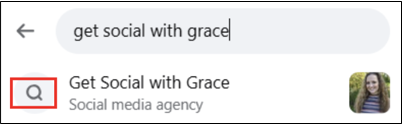
Start by logging into your personal Facebook account, then use the search bar to find the business page.

Step 2 


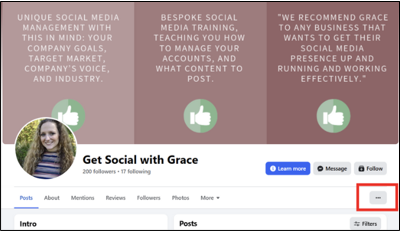
Once you’re on the page, click the three dots on the right-hand side.

Step 3


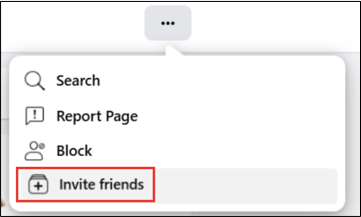
Select ‘Invite Friends’ from the menu.

Step 4


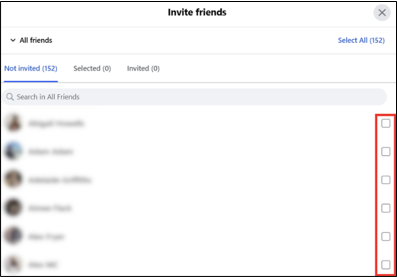
You’ll see a list of all your Facebook friends. Tick the friends you want to invite or click ‘Select All’ in the top right.

Step 5

Send the invitations and that’s it!


One of the best parts about this hack is that you don’t need to be a page admin to do this. Anyone can use this simple trick, friends, family or colleagues, to help more people hear about your business. It takes a few minutes and could easily bring in some new customers.


https://getsocialwithgrace.com/wp-content/uploads/2025/09/GSWG-Boost-your-Facebook-page-likes-in-just-a-few-clicks-1500-x-1000-px.png 1000 1500 Grace https://getsocialwithgrace-com.stacktemp.com/wp-content/uploads/2023/08/get-social-with-grace-web-logo-300x99.png Grace2025-09-30 14:12:152025-09-30 14:16:49Boost your Facebook page likes in just a few clicks!

Absolute giveaways that you’re using ChatGPT…

September 30, 2025/in Social media

Most of us have used ChatGPT, maybe to help with work or just to see what it’s capable of. If you’re going to use it, it’s worth knowing how to get the best out of it. We’ve picked out a few of the more noticeable patterns it tends to follow when generating a response.

The em dash

One of the easiest tells that AI helped write your copy is the em dash. It’s fine in moderation but when you see multiple in the same piece, it’s a giveaway. Edit them so they’re not always necessary and a quick reword can usually fix it.

Every First Letter Is Capitalised Like This

It’s common to see lists where every word starts with a capital letter, even when it’s not a heading. While capital letters are useful for names, the start of a sentence or when you want to highlight something important, they’re not needed all the time. If everything’s capitalised, it can feel a bit unnatural. This is another clue that the copy might’ve come from AI.

American spellings

ChatGPT will often generate text with a few American spellings including favorite, color, organize and so on. These are a bit of a giveaway and should be switched to UK spellings. It’s always worth a quick double or triple check before posting.

Your call to action is painfully generic

Generic prompts like ‘Sign up’, ‘Learn more’ or ‘Get started’ don’t explain what you’re offering and they’re easy to ignore. Instead, try adding context, ‘Sign up to our newsletter for the latest offers,’ this gives people a reason to click.

No personality

ChatGPT can do a lot but one thing it isn’t is human. It doesn’t know your voice, your humour or how you naturally string a sentence together. And that’s what makes your content stand out.

These days, generic doesn’t cut it. People want personality and your version. AI can help with ideas but the final voice needs to be yours.

How can you use it

Artificial Intelligence is a clever tool but it shouldn’t mean that we lose our voice or strip away the personality that makes our work ours.

This is how you can use it:

  • Train it by feeding it past captions and website url.
  • Always give it context.
  • Give it a voice by telling it your tone of voice and personality like sarcastic, direct etc.
  • Remember to build a profile on who you are, what you do, who you serve and how.
  • Make sure to use it as your first draft, not your last!
  • Edit the language to remove some of the jargon.
https://getsocialwithgrace.com/wp-content/uploads/2025/09/GSWG-Absolute-giveaways-that-youre-using-ChatGPT-1500-x-1000-px.png 1000 1500 Grace https://getsocialwithgrace-com.stacktemp.com/wp-content/uploads/2023/08/get-social-with-grace-web-logo-300x99.png Grace2025-09-30 14:00:092025-09-30 14:17:30Absolute giveaways that you’re using ChatGPT…

Why keywords matter now more than ever on Instagram

August 11, 2025/in Instagram, Social media

As of last month, Google has started indexing Instagram posts (photos, reels, carousels and more) directly in its search results. This means your Instagram content can now appear when people search relevant keywords on Google, not just within the app.

For business owners and marketers, this shift opens up new possibilities for organic reach. So, let’s see how you can become searchable.

How to become eligible

Instagram content can be indexed by Google and other search engines, provided the account meets certain criteria. This can help increase visibility outside the platform.

Content is eligible for indexing if:

  • The account is set up as a Business or Creator profile
  • The user is over 18
  • The account is public
  • The content includes posts, reels, carousels and videos (stories are not yet indexed)

Indexing is enabled by default for professional accounts. While it’s possible to opt out through privacy settings, keeping indexing active may support broader reach and discoverability.

Why it’s great for business owners

If you’re a small business just starting out, you might not have the budget for a full website yet. The good news is, Instagram can now do more than just connect you with followers, it can help people find you through search.

With recent changes, your posts aren’t limited to your audience on the app. They can show up in Google searches too. That means one well-written Instagram post can be enough to get noticed, without needing a separate blog or website.

Even older content, like a reel explaining your pricing, might start bringing in new leads again, just because someone searched for that topic. Before, if a post didn’t gain traction within a couple of days, it was unlikely to be seen again. But now, searchability gives your content a longer life and a better chance of being discovered.

What you need to do today

To really maximise this new feature, you’ll want to make sure your account and content are ready to go. First off, this only applies to professional accounts, so either Business or Creator. Head to your settings, tap Account, then Account Type. If it says “Personal,” switch it. You can opt out of indexing if you want, but why would you?

Your Instagram profile is now basically your homepage, so treat it like one. That means using keywords in your bio that people might actually search for, adding your location to help with SEO and picking the right category so it’s clear what you’re about. Also, make those first 125 characters of your bio count, they’re what show up in search previews.

When it comes to captions, it’s not just about speaking to your followers anymore. You’re also speaking to Google. So, write captions that answer questions your audience might be searching for and use natural keywords they’d type into a search bar. If you’re location-based, use local hashtags and tag your location so you show up in “near me” searches.

And don’t forget subtitles or on-screen text in your videos. It’s not just about accessibility (though that’s important), it also helps search engines understand your content better. If you want to be found, make it easy for both people and platforms to know who you are and what you do.


This is a massive shift in how organic visibility works. Instagram has become searchable, findable and linked to your business growth. Don’t just aim your content at your followers make it searchable. If you need support with this social change, feel free to get in touch.

https://getsocialwithgrace.com/wp-content/uploads/2025/08/kate-torline-VeiqoYAEeis-unsplash-scaled.jpg 1707 2560 Grace https://getsocialwithgrace-com.stacktemp.com/wp-content/uploads/2023/08/get-social-with-grace-web-logo-300x99.png Grace2025-08-11 08:29:462025-08-12 19:59:34Why keywords matter now more than ever on Instagram

Buffer vs Hootsuite: which social media management tool is right for you?

February 19, 2025/in Business, Social media

In order to create consistent and better quality social media content, a social media scheduling tool is a MUST. In my training sessions, I explain that a tool like Buffer or Hootsuites gives you the ability to create a batch of posts, post them across multiple platforms at once, and schedule them in advance. It’s vital for time management.

There are plenty of options to choose from, but the two names you’ll see popping up most often in this category are Buffer and Hootsuite. Both Buffer and Hootsuite have plenty to offer, like scheduling, analytics and overall management. But they cater to different tastes. Let’s explore what makes Buffer and Hootsuite different, so you can pick the one that suits your business best.

Buffer

Buffer is designed to help small to medium businesses, solopreneurs and creators manage their social media accounts with ease. Here are the plans you can choose from:

  • Free Plan: Juggle up to 3 social media accounts/channels without spending a penny.
  • Essentials Plan: $6 per channel per month (or $5 per channel if you commit for a year).
  • Team Plan: $12 per channel per month (or $10 per channel annually).

You can try the Essentials and Teams plans with a 14-day free trial before subscribing.

Buffer is super user-friendly, making it easy to set up and manage multiple social media accounts. The Ideas Hub is your go-to place to add content ideas, text and media until you’re ready to hit that publish button.

With Buffer’s engagement tools, keeping track of comments on Facebook and Instagram is simple. Plus, you can filter comments based on sentiments like ‘negativity,’ ‘order’ and ‘question’ to make sure you respond to the most important ones first.

For those on the Teams and Agency plans, Buffer allows an unlimited number of users. You can grant full posting access, where users’ posts and ideas are published as scheduled, or set up approval-required access for a bit more control. You can even limit user access to specific social media accounts if needed.

Hootsuite

Hootsuite is here to help larger social media marketing teams at bigger businesses. A quick rundown of the plans:

  • Professional Plan: £89 per month (billed annually)
  • Team Plan: £249 per month (billed annually)
  • Enterprise Plan: Contact for pricing

Both the Professional and Team plans come with a 30-day free trial, just enough time to try it out!

Hootsuite is packed with handy social media management tools, like bulk scheduling and paid posts. Plus, if you’re on the Team plan or higher, you’ll get access to the Content Library to store all your media files.

Managing your social media interactions is simple with Hootsuite’s Inbox. It keeps tabs on Facebook Pages’ private messages, comments, replies, visitor posts, X’s direct messages and LinkedIn Pages’ comments and replies.

For tracking mentions and sentiment towards your company or brand, Hootsuite provides social listening tools. The basic features are available to all but full access requires the Enterprise plan.

Designed for large teams, Hootsuite allows users to set detailed permissions on who can see and access content. It supports complex team management with organisations, teams and channels, letting superusers assign tasks, route messages and control access to social accounts.

Keep in mind that large teams will need to pay extra if they require more than five users per account, even on the premium Enterprise plan.


Choosing between Buffer and Hootsuite really does depend on what you and your business requires. One isn’t better than the other but one might work better for you.

https://getsocialwithgrace.com/wp-content/uploads/2025/02/GSWG-Buffer-v-hootsuite-cover-image-1.png 600 1200 Grace https://getsocialwithgrace-com.stacktemp.com/wp-content/uploads/2023/08/get-social-with-grace-web-logo-300x99.png Grace2025-02-19 20:34:102025-02-19 20:34:10Buffer vs Hootsuite: which social media management tool is right for you?

How to use awareness days in your content marketing

January 20, 2025/in Instagram, Social media
What are awareness days?

You’ve probably come across a few different awareness days without even realising it over the years, including Valentine’s Day, Halloween and Christmas. Yes, these are all awareness days you’ve heard of, but did you know there are in fact hundreds of others that run every year?

Awareness days are designed to draw your attention to specific issues, causes and events. You might wonder how this is relevant for your business – they allow you to explore specific topics and create engaging content for your socials.

Why should you use awareness days in your business?

Incorporating awareness days into your content calendar can help you keep content fresh and relevant. They provide a great opportunity to align your marketing efforts with important dates that resonate with your audience. Plus, they can inspire new content ideas and offer a chance to highlight causes that are important to you and your audience.

Using awareness days allows your business to create unique content, promoting your brand and increasing your social media presence. The more people you reach, the more likely you are to find your ideal audience.

However, it’s crucial to be selective with your awareness days and choose ones that align with your values. It’s always important to add context to your chosen awareness days to make them more personal and relatable to your audience. Most awareness days will have specific hashtags for social media so be sure to use those in your posts to maximise engagement.

Example ideas

Once you’ve chosen a few awareness days to focus on, the next step is to think of some content ideas. This part can sometimes be tricky, but don’t worry if you’re short on ideas—we’ve put together a few examples to help get you started.

Example 1: National Love Your Pet Day

To celebrate National Love Your Pet Day, consider inviting your employees to share pictures of their pets. You can create a post showcasing a selection of these photos, highlighting how much you value your employees and their furry friends. To encourage engagement, you could ask your audience to participate by sending in photos of their pets as well. People love pet photos!

For businesses similar shops or cafés, you can ask customers who bring in their pets for a photo. This not only supports the awareness day but it’s also an opportunity to promote that your business is pet-friendly.

Example 2: National Biscuit Day

Who doesn’t enjoy a good biscuit? You could make a fun reel by asking everyone in your office about their favourite biscuit. Bringing in a selection of biscuits will add a personal touch.

For a more creative approach, you could host a biscuit bake off. Get the team involved in baking their best biscuits and use the event for some great social media content. This will not only bring your team together but also provide your audience with some tasty inspiration.

Example 3: Social Media Kindness Day

Social Media Kindness Day is a perfect opportunity to encourage your audience to leave you a Google review. Share some testimonials you’ve already received and turn them into a reel or a montage of photos.

It’s also a great time to remind your audience about the importance of being kind on social media. Offer some top tips to promote positive interactions and build a supportive online community.

DOWNLOAD OUR AWARENESS DAYS CALENDAR

So how do you know what awareness days are coming up, we hear you ask? Fortunately we’ve put together a 2025 awareness days calendar, available for you to download. Just click this link, enter your name and email, and you’re all set to download our awareness days calendar. Simple!

https://getsocialwithgrace.com/wp-content/uploads/2025/01/GSWG-How-to-use-awareness-days-in-your-content-marketing-1.png 800 1200 Grace https://getsocialwithgrace-com.stacktemp.com/wp-content/uploads/2023/08/get-social-with-grace-web-logo-300x99.png Grace2025-01-20 15:45:372025-01-20 15:47:14How to use awareness days in your content marketing
Instagram engagement

Steps to improve Instagram engagement in 2024

August 20, 2024/in Instagram, Social media

Instagram remains the strongest for engagement and brand visibility, in the continuous world of social media. As we venture into 2024, Instagram continues to change, demanding new strategies to capture and retain audience attention. Whether you’re a business aiming to expand your audience or an influencer seeking to maintain connections, enhancing your Instagram engagement is crucial.

What is Instagram engagement?

Instagram engagement goes beyond likes and follows. It’s about creating meaningful interactions that are relatable for your audience. This includes likes, comments, shares and saves. These are all contributing factors that determine the visibility and relevance of your content.

Strategies to support your Instagram engagement
1. Create high-quality content

Captivating visuals and well-crafted captions are the foundation for Instagram engagement. It is important to prioritise content that is not only visually pleasing but also relevant and valuable to your followers. It is important to experiment with different formats including carousel posts, reels and IGTV videos.

2. Optimise your profile

Your Instagram profile is vital as this is the first impression potential followers will see before scrolling through your feed. Ensure it is complete with a clear bio, profile picture and a link to your website or latest content. Try including keywords relevant to your audience to enhance discoverability through Instagram’s search and explore features.

3. Engage actively with your audience

Authentic engagement is the key to emerging a loyal community on Instagram. It is important to respond promptly to comments, direct messages and mentions. Initiating conversations through polls, questions or interactive stickers in your Stories will help to encourage participation and feedback.

4. Use hashtags strategically

Hashtags are used to increase your content’s reach on Instagram. Research trending hashtags and use a mix of specific and broader hashtags relevant to your posts and audience. Avoid overusing hashtags; instead, focus on quality and relevance.

5. Collaborate with influencers/partners

Partnering with influencers or complementary brands can expose your profile to a wider following. Look for collaborators who have similar values to yours and the types of followers who could benefit from your content. Collaborative posts and takeovers can inject freshness into your feed while attracting new followers. Here’s our guide to influencer marketing.

6. Post consistently

Consistency is crucial for maintaining engagement on Instagram. Develop a posting schedule that aligns with your audience’s screentime. Use Instagram Insights to track when your followers are most active and experiment with different posting times to maximise visibility.

7. Encourage user-generated content

User-generated content not only broadens your feed but also strengthens the relationship between the account and the followers. Encourage your followers to share their experiences with your products or services by reposting their content (with their permission) and crediting the account. This not only encourages engagement but also builds trust and credibility.

8. Monitor and analyse performance

Continuously, monitor Instagram Insights to understand the performance of your posts and identify what works best with your audience. Remember to track your reach, impressions and engagement rate to refine your content strategy.

Overall

As Instagram continues to evolve in 2024, adapting and refining your engagement strategies is essential to staying relevant and competitive. With a focus on quality content, authentic interactions and strategic use of features including hashtags, you can effectively promote your Instagram engagement and gain a loyal following. It is important to remember that building meaningful connections takes time and effort, but the rewards in terms of increased engagement and brand loyalty make it worth it.

https://getsocialwithgrace.com/wp-content/uploads/2024/08/Instagram-engagement.jpg 1280 1920 Grace https://getsocialwithgrace-com.stacktemp.com/wp-content/uploads/2023/08/get-social-with-grace-web-logo-300x99.png Grace2024-08-20 13:51:132024-08-31 18:26:38Steps to improve Instagram engagement in 2024

TikTok vs Instagram Reels: Which Platform is Best for Your Business?

July 11, 2024/in Business, Instagram, Social media

TikTok and Instagram Reels are two of the most popular platforms for short-form content. Both offer great opportunities for businesses to engage with their audiences. But which one is right for you?

TikTok

TikTok’s audience is primarily younger, with many users aged 16 to 24, making it ideal for businesses targeting Gen Z and young millennials. However, the platform’s user base is growing and diversifying. TikTok is perfect for brands in the fashion, beauty, music, and lifestyle industries due to its fast-paced, creative environment. The algorithm favours engaging, trend-driven content, so don’t be afraid to get in front of the camera and jump on the latest trends to produce funny and entertaining videos!

Pros and cons of TikTok

Pros:

  • TikTok’s algorithm can push content to millions of users, even if you have a small following.
  • There are high levels of user interaction on the platform, particularly through likes, comments, and shares.
  • High potential for videos to go viral, boosting brand visibility.

Cons:

  • Creating high-quality, engaging content can be time-intensive.
  • TikTok is a fast-moving platform, and keeping up with constantly changing trends while running a business can be challenging.
Instagram

Instagram, a familiar platform for many businesses, has been around since 2010. Instagram Reels share a lot of similarities with TikTok in format but offer the added benefit of integration with other Instagram features and cross-posting to Facebook, increasing your reach with minimal effort. Instagram’s demographics are also broader than TikTok with their primary users aged between 18 and 34.

Pros and Cons of Instagram

Pros:

  • As part of Meta reels are also posted to Facebook, leveraging followers across both platforms
  • It’s easier to maintain a cohesive brand image with cross-posting and photo posts too
  • Many businesses already have an Instagram presence, making Reels a natural extension.

Cons:

  • Instagram’s algorithm can be less forgiving compared to TikTok’s, potentially limiting reach.
  • High competition due to the platform’s popularity.
Do you need to choose?

If you’re unsure which platform is best for your business, why not use both? Repurposing content across TikTok and Instagram Reels can save time and expand your reach. Keep your core content the same and adjust the style for each platform—create polished videos for Instagram and spontaneous, trend-focused videos for TikTok.

Both TikTok and Instagram Reels have their unique advantages. TikTok is great for virality and reaching younger audiences, while Instagram Reels seamlessly engage an established audience. By understanding the strengths of each platform and repurposing your content strategically, you can maximise your social media impact and stay ahead online.

https://getsocialwithgrace.com/wp-content/uploads/2024/07/TikTok-Vs-Instagram-Reels-Blog-Image-.png 800 1200 Grace https://getsocialwithgrace-com.stacktemp.com/wp-content/uploads/2023/08/get-social-with-grace-web-logo-300x99.png Grace2024-07-11 13:46:562024-08-31 18:28:40TikTok vs Instagram Reels: Which Platform is Best for Your Business?
Page 1 of 7123›»

Recent Posts

  • 5 video ideas for people who hate being on camera
  • What to post when you have ‘nothing to post’
  • Social media myths for small businesses debunked

Get social media tips sent straight to your inbox!

Categories

  • Business
  • Facebook
  • Instagram
  • LinkedIn
  • Social media
  • Twitter
  • Uncategorized

Take the next step by completing this form and I will be in touch.

Or if you’d prefer…

Email me: hello@getsocialwithgrace.com

Give me a call: 07780 436116


    CONTACT DETAILS

    Get Social with Grace  |  Bury St Edmunds, Suffolk  | T: 07780 436116  | E: hello@getsocialwithgrace.com

    © Copyright 2018 - Get Social With Grace
    • Link to LinkedIn
    • Link to Instagram
    Scroll to top Scroll to top Scroll to top