
Ways to elevate your LinkedIn profile for maximum impact
LinkedIn is the social media platform where you can use your own profile to build your professional brand, share content with other professionals, and connect with potential clients, business partners and employees.
Personally for my business, it’s given the biggest return on investment of my time. It’s also the channel that I’m covering more and more in my social media training sessions, as many business owners feel least confident that they’re using the platform correctly. So I thought it would be worth breaking down the basics of your LinkedIn profile and how to make sure it’s at its best.

1. Profile picture
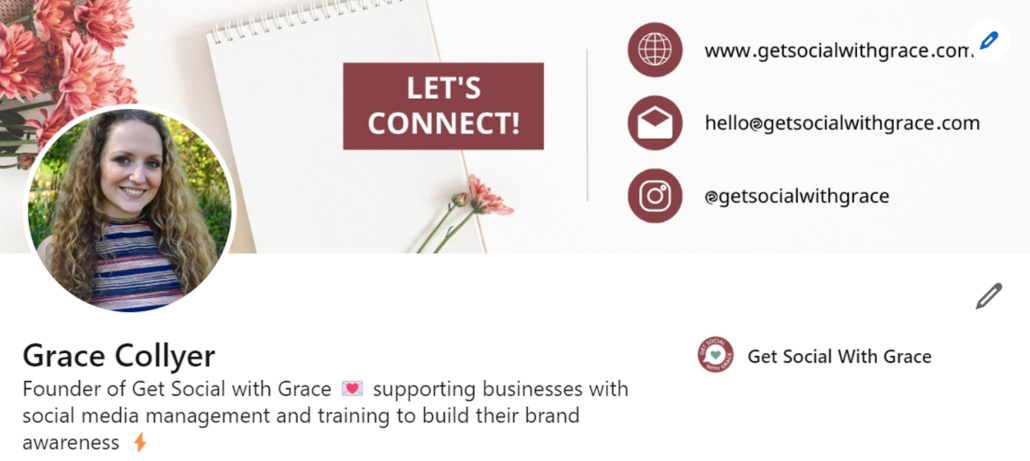
Your profile picture should be recent, and your face should take up around 60 percent of the total space. It should match how you would normally look in your work environment so people can easily identify you, for example if they’re briefly met you through networking.
2. Cover image
The cover image is a part of your profile worth utilising as it takes up quite a bit of space and it’s one of the first things people see when viewing your profile. Some people use it to display a collage of their work/projects, others create a graphic that displays their contact details and web address. To keep things consistent, ensure any colours and fonts you select when creating a graphic match your branding. See 6 LinkedIn cover photo ideas.
3. Headline
Your headline is displayed below your name with almost everything you do on LinkedIn; send a connection request, send a message, publish a post, comment on a post, and appear in search results; make sure it clearly states what you do. Rather than simply writing your job title – “Owner of X company” – expand on this (with some keywords) to briefly describe what it is you offer.
My example: Founder of Get Social with Grace 💌 supporting businesses with social media management and training to build their brand awareness ⚡️
If appropriate, feel free to incorporate emojis to add some character.
4. Profile URL
When you first create your LinkedIn profile, LinkedIn will assign a line of random numbers to your URL. This doesn’t look great when linking to your profile, but they can easily be removed.
- Go to your profile
- Click Contact info and the pencil icon
- Click your URL
- Click the pencil below ‘Edit your custom URL’
- Change your URL and save your changes
This will provide you with a link that is easy to share, and recognisable to other people who may be searching for you.
So we’ve covered the basics of the first section of your LinkedIn profile. Let’s now explore more…
About
It’s amazing to see how many people still leave this field blank in their LinkedIn profile. Your summary is your chance to tell your own story – so don’t just use it to list your skills or the job titles you’ve had. Try to bring to life why those skills matter, and the difference they’ll make to the people you want to work with. Also include some personal information about yourself, such as interests and hobbies, so people can feel connected to you.
Recommendations
Recommendations are a vital part of building your authority and credibility on your LinkedIn profile. You can also repurpose them as testimonials on your website and as posts on your social media channels.
Get in touch with not only clients, but also people you have worked with, and ask them to leave a recommendation on your profile.
Growing your connections
Begin by syncing your profile with your email address book, which will provide a list of all of your email contacts who have a LinkedIn profile. Beyond this, get into the habit of following up meetings and networking events by sending LinkedIn connection requests to anyone you meet – it’s a great way of keeping your network vibrant and up to date.
Another strategy to grow your connections is to connect with like-minded people within your industry and/or local area. Think about other types of businesses that are non-competing in your field, connect with them, and even follow up with a brief introductory message. This is a much better way of building your network than connecting with potential customers and trying to sell to them.
Stay active on LinkedIn
LinkedIn is a social media tool. Yet, only 3% of users post more than once per week. Such a small figure! It is different to other social media platforms, but it’s still a useful tool to connect and build relationships with like-minded professionals. It’s important to post your own updates, as well as engage in other posts and discussions that might interest you. This will help to expand your network.


Leave a Reply
Want to join the discussion?Feel free to contribute!